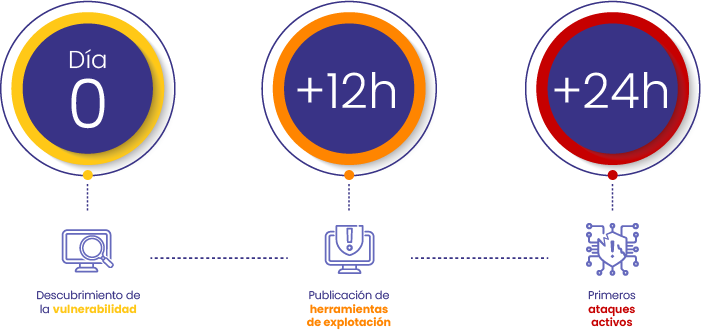

Imagina que es lunes por la mañana. Enciendes tu computadora y todo parece normal… hasta que un correo malicioso se abre solo. De repente, tus archivos más importantes desaparecen y tus programas dejan de funcionar. Es un ataque. La razón es simple: tu sistema operativo ya no recibe soporte ni actualizaciones de seguridad, lo que lo dejó sin defensas contra los ciberdelincuentes. El daño es real: en cuestión de horas, podrías sufrir pérdida de datos, paralización de operaciones y enormes pérdidas financieras, todo por operar con un equipo vulnerable.
Este escenario de pesadilla no es una historia de ficción. Con el fin de soporte de Windows 10 acercándose, es una realidad para millones de usuarios. Microsoft ha confirmado que el martes 14 de octubre de 2025 será la fecha límite para recibir actualizaciones y soporte oficial.
A pesar de haber sido el sistema operativo dominante durante años, Windows 10 ahora representa cerca del 46% del mercado global, mientras que Windows 11 ya ha superado el 49% de presencia. A partir de la fecha de caducidad, será necesario actualizar a Windows 11 para seguir recibiendo soporte en servicios clave como Microsoft 365 y, lo más importante, las actualizaciones de seguridad cruciales.
Ignorar esta transición no solo deja tus equipos desprotegidos, sino que también afecta la seguridad, la productividad y la continuidad de tu operación. Cada computadora se vuelve más vulnerable a ataques, pérdida de información y fallos sin una solución rápida. Esto puede generar interrupciones, aumentar los costos de soporte y dañar la reputación de tu empresa.
Además, los equipos con Windows 10 dejarán de ser compatibles con las nuevas aplicaciones y servicios clave, lo que podría hacer que las empresas se queden atrás. No es solo una actualización: es una decisión estratégica para proteger la información y el corazón digital de tu negocio. Se estima que 240 millones de computadores personales quedarán obsoletos por no cumplir con los requisitos mínimos de hardware para-Windows 11, lo que obligará a millones de usuarios a reemplazarlos.
¿Cómo enfrentar esta transición sin interrumpir tu operación?
Migrar a Windows 11 no tiene por qué ser una carrera contra el tiempo. El verdadero reto es hacerlo de forma organizada, sin detener el trabajo diario y asegurándote de que todos los equipos estén protegidos. Aquí es donde entra en juego una herramienta como Aranda Device Management (ADM), que simplifica el proceso al dividirlo en dos fases claras y sencillas:
Inventario de Hardware: La clave para saber por dónde empezar

Antes de hacer cualquier cambio, necesitas saber qué computadoras de tu empresa están listas para la migración. Es como hacer una lista de verificación: ¿cuáles cumplen los requisitos? Muchos equipos con Windows 10 pueden necesitar una actualización interna o, en algunos casos, ser reemplazados. Con la funcionalidad de Inventario de Hardware de ADM, puedes escanear y evaluar automáticamente todos los equipos de tu red. Esto te permite saber exactamente cuáles son compatibles para la migración sin tener que revisar cada uno de forma manual, ya que verifica los siguientes requisitos técnicos:
- Procesador: 1 GHz o más rápido, con al menos 2 núcleos en un procesador o SoC compatible de 64 bits.
- RAM: mínimo 4 GB
- Almacenamiento: 64 GB o más.
- Firmware: UEFI, compatible con Arranque Seguro (Secure Boot).
- TPM: versión 2.0.
- Tarjeta gráfica: compatible con DirectX 12 y driver WDDM 2.0.
- Pantalla: mayor a 9” con resolución HD (720p) y 8 bits por canal de color.
- Conexión a Internet: requerida para configuración inicial y actualizaciones.
Software Delivery: La forma de migrar de manera inteligente

Una vez que sabes qué equipos son compatibles, la funcionalidad de Software Delivery entra en acción para automatizar el trabajo pesado. ADM te permite aplicar la actualización de Windows 11 de forma masiva y programada.
- Implementaciones masivas: Puedes aplicar la actualización a un gran número de equipos a la vez, sin tener que hacerlo de uno en uno.
- Instalaciones programadas: Elige el momento exacto para que se ejecute el proceso, por ejemplo, fuera del horario laboral, sin afectar la productividad.
- Despliegues por grupos: Organiza la migración en fases. Esto te permite hacer una prueba piloto en un grupo pequeño de usuarios para asegurar que todo funcione correctamente antes de implementarla en el resto de la empresa.
Con este enfoque, te aseguras de que cada equipo reciba la actualización, optimizando la administración y garantizando una transición a Windows 11 que es rápida, segura y no afecta la productividad de tu negocio.
Una oportunidad para evolucionar
El fin del soporte de Windows 10 no es una amenaza, sino una oportunidad estratégica para modernizar la operación de tu negocio. Con las capacidades de Aranda Device Management desde el inventario de hardware hasta la entrega de software puedes liderar esta transición tecnológica con eficiencia y sin interrupciones en la productividad.
Es más que una simple actualización; es una decisión clave para la seguridad, el cumplimiento y la competitividad de tu empresa.
Actúa hoy. Protege tu operación. Evoluciona con inteligencia.