Is your company prepared for the end of Windows 10 support? 

Imagine it's Monday morning. You turn on your computer and everything seems normal... until a malicious email opens by itself. Suddenly, your most important files disappear and your programs stop working. It's an attack. The reason is simple: your operating system no longer receives support or security updates, leaving it defenseless against cybercriminals. The damage is real: in a matter of hours, you could suffer data loss, operational paralysis, and huge financial losses, all because you are operating with vulnerable equipment. 

This nightmare scenario is not a fictional story. With the end of support for Windows 10 approaching, it is a reality for millions of users. Microsoft has confirmed that Tuesday, October 14, 2025, will be the deadline for receiving updates and official support. 

Despite having been the dominant operating system for years, Windows 10 now accounts for about 46% of the global market, while Windows 11 has already surpassed 49% market share. After the expiration date, it will be necessary to upgrade to Windows 11 to continue receiving support for key services such as Microsoft 365 and, most importantly, critical security updates. 

Ignoring this transition not only leaves your equipment unprotected, but also affects the security, productivity, and continuity of your operation. Each computer becomes more vulnerable to attacks, data loss, and failures without a quick solution. This can lead to disruptions, increased support costs, and damage to your company's reputation. 

In addition, Windows 10 devices will no longer be compatible with new key applications and services, which could cause businesses to fall behind. This is not just an update: it is a strategic decision to protect the information and digital heart of your business. It is estimated that 240 million personal computers will become obsolete because they do not meet the minimum hardware requirements for Windows 11, forcing millions of users to replace them. 

How can you handle this transition without disrupting your operations? 

Migrating to Windows 11 doesn't have to be a race against time. The real challenge is doing it in an organized way, without interrupting daily work and ensuring that all devices are protected. This is where a tool like Aranda Device Management (ADM) comes in, simplifying the process by dividing it into two clear and straightforward phases: 

Hardware Inventory: The Key to Knowing Where to Start 

Before making any changes, you need to know which computers in your company are ready for migration. It's like making a checklist: which ones meet the requirements? Many Windows 10 computers may need an internal upgrade or, in some cases, replacement. With ADM's Hardware Inventory feature, you can automatically scan and evaluate all computers on your network. This allows you to know exactly which ones are compatible for migration without having to check each one manually, as it verifies the following technical requirements: 

  • Processor: 1 GHz or faster, with at least 2 cores on a compatible 64-bit processor or SoC. 
  • RAM: minimum 4 GB 
  • Storage: 64 GB or more. 
  • Firmware: UEFI, compatible with Secure Boot. 
  • TPM: version 2.0. 
  • Graphics card: compatible with DirectX 12 and WDDM 2.0 driver. 
  • Screen: larger than 9" with HD resolution (720p) and 8 bits per color channel. 
  • Internet connection: required for initial setup and updates. 

Software Delivery: The smart way to migrate 

Once you know which devices are compatible, the Software Delivery feature kicks in to automate the heavy lifting. ADM allows you to apply the Windows 11 update in bulk and on a scheduled basis. 

  • Mass deployments: You can apply the update to a large number of computers at once, without having to do it one by one. 
  • Scheduled installations: Choose the exact time for the process to run, for example, outside of working hours, without affecting productivity. 
  • Group rollouts: Organize the migration in phases. This allows you to pilot test with a small group of users to ensure everything works correctly before rolling it out to the rest of the company. 

With this approach, you ensure that every device receives the update, optimizing administration and ensuring a transition to Windows 11 that is fast, secure, and does not affect your business productivity. 

An opportunity to evolve 

The end of Windows 10 support is not a threat, but rather a strategic opportunity to modernize your business operations. With Aranda Device Management's capabilities, from hardware inventory to software delivery, you can lead this technological transition efficiently and without interruptions in productivity. 

It's more than just an update; it's a key decision for the security, compliance, and competitiveness of your company. 

Act today. Protect your operation. Evolve intelligently. 

Mobile Device Management (MDM): Key to Enterprise Mobility 

Today, 67% of employees use up to three devices for work (Gartner, 2024). This poses a challenge: how can you control and protect so many devices without losing productivity? 

The answer lies in Mobile Device Management (MDM). With tools such as Aranda Enterprise Mobility Management (AEMM), companies can centralize control of smartphones, tablets, and laptops, reducing security risks and optimizing resources. 

1. Choose the right supplier 

A good technology partner not only offers software, but also consulting, support, and scalability. Aranda combines expertise in IT asset management with business process integration, ensuring successful implementations. 

2. Plan before implementing 

Mobility requires strategy. Evaluate operating systems, define which processes will benefit, and start with pilot programs to measure results. This will ensure security and return on investment. 

3. Safety as a priority 

Over 80% of incidents on mobile devices stem from a lack of controls (Verizon, 2024). With MDM, you can: 

Define accesses by role. 

Monitor in real time. 

Comply with safety regulations. 

AEMM offers these functions from a single console, protecting data and operations. 

4. Benefits of an MDM strategy 

Increased productivity: autonomous and connected employees. 

Greater security: data protected at all times. 

Agile collaboration: teams working from anywhere. 

Cost reduction: total control over assets and licenses. 

5. Maintain continuous improvement 

Mobility is not a one-time project. It requires constant updating, measurement, and adjustment. With Aranda, companies have access to ongoing support, updates, and training, ensuring growth without losing control. 

Patching is not optional: the clock starts ticking from the very first minute.

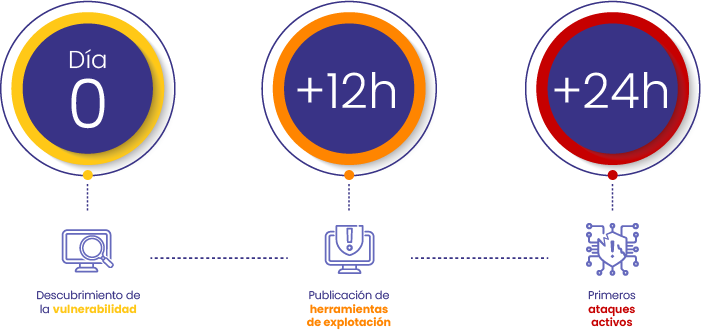
Digital threats wait for no one. This is what the cycle of a critical vulnerability looks like today:

Timeline of a digital threat

1. A new critical vulnerability is detected in a widely used application.
2. Hours later, methods and tools developed by cybercriminals to exploit it are already circulating.
3. In less than 48 hours, the first attacks are already underway.

And if your infrastructure doesn't have an agile and effective process for closing those gaps through updates, you're leaving the door open to attackers.

Every hour without applying a patch is an opportunity for a threat to become real.

Automating patch management reduces risk, improves response speed, and protects your systems before it's too late.

In cybersecurity, the difference between being protected and suffering an attack can be a matter of hours.

48 hours: the new margin for maneuver

The time available to act on critical vulnerabilities is becoming increasingly shorter.

It's not enough to just apply updates: you have to do it quickly, accurately, and without relying on manual processes.

Is your organization prepared to respond in less than 48 hours?

To achieve this, three fundamental capabilities are needed:

  • Have complete visibility of all devices that need to be protected
  • Identify and prioritize intelligently to know what to address first
  • Having automated tools that allow patches to be applied even to computers that are not connected to the network

Why is timely patching still a challenge?

Today, many IT environments are designed to offer flexibility, but patching in a timely manner is not easy. Many IT environments are designed to be flexible, but not to react quickly to security threats. There are computers that go days without connecting to the network, users who work from home or on the go, older systems that require manual updates, different versions of software running at the same time, and, in many cases, a lack of a clear update policy. All of this makes it difficult to keep systems protected.

In this scenario, continuing to use traditional patching methods not only slows down the response to risks, but also makes protection against increasingly rapid threats unsustainable.

ADM: automated patching for an unpredictable world

The patching functionality included in Aranda Device Management (ADM) is designed to reduce risk without increasing operational overhead.

With ADM, you can:

  • Automatically detect outdated equipment
  • Prioritize patches based on criticality, user type, or device
  • Schedule silent deployments at defined times
  • Automate distribution in hybrid environments
  • Get clear reports on compliance and gaps

And it's not just about operating system patches. ADM also supports third-party applications, including productivity tools and specialized software.

Your attack surface does not reduce itself

With threats constantly growing and spreading rapidly, waiting to act is no longer an option. Reactive patching means living with open vulnerabilities, leaving your infrastructure exposed at all times. Without automation and clear priorities, the update process becomes slow, manual, and difficult to scale.

With ADM, patching is no longer a burden—it becomes an advantage. By automating and centralizing patch management, you can close gaps faster, reduce risk, and free up your IT team to focus on strategic tasks.

The result: greater safety, less exposure, and much more efficient operation.


Ready to take the next step?

Schedule your personalized demo and see how Aranda can strengthen the security of your IT environment from the core.

Aranda Software | Protect what drives your business.

5 Key Tips for Choosing Field Service Software 

The cloud and mobile technologies are redefining how we operate and connect with each other. For field service managers, these innovations are essential, as they offer ways to optimize processes and improve customer service quality. Keeping up with trends in IT service management is not just an advantage, it is a necessity for any company that aspires to operational efficiency and a robust service management system.

Gartner's annual report on Mobile Service Management evaluates field service management solutions and presents key trends that managers should consider. Below, we will explore the five fundamental reasons for choosing field service software, highlighting how Aranda Field Service (AFLS) meets these needs as a comprehensive solution for field service management. 

1. Stay Connected – Anytime, Anywhere  

Field service work requires constant connectivity and information. That's why it's essential that the service management software used by your managers and technicians works seamlessly across various mobile devices. It should also offer essential complementary features such as billing and network management. In fact, according to Gartner, service management software should also include robust social features to keep technicians and administrative staff connected in the field. This is precisely where uninterrupted connectivity and the integrated tools of Aranda Field Service (AFLS) become crucial for effective incident management and agile technical support.

2. Mobile Phones Are a Must for Field Support  

Today, it is impossible to overlook the importance of having strong mobile capabilities for field service software. Trying to navigate complex software that is not optimized for mobile devices is a major problem for those who work on the road. Field service teams need high-performance mobile applications that allow users to access critical tools such as inventory management, sales, and service offerings. Mobility, connected by an efficient help desk system, will ensure effective incident management and agile customer support. Robust customer service software must prioritize the mobile experience to optimize field productivity and ticket management from anywhere.  

3. Implementation Models Do Matter 

When choosing service management software, field service managers must consider how the solution will be deployed (e.g., SaaS solution) and determine what works best for their organization. According to Gartner, SaaS models are increasingly popular among field service management teams, who value the convenience, simplicity, and cost savings that come with cloud-based software. It's a great idea to choose service management software that is built around the SaaS model, so everything runs smoothly and the business can evolve on a large scale. The flexibility of SaaS models, coupled with a web-based service desk platform, will define your company's operational efficiency and fits perfectly with the online service desk.

4. The importance of software integration  

Performing field service tasks often involves the use of ERP, CRM, or Service Desk applications. Therefore, when choosing service management software, it is increasingly important that it communicates effectively with other systems. According to the Gartner report, the strongest vendors demonstrated that they could easily integrate with third-party business applications. The ability to integrate with help desk platforms, ticket management software, and ITIL systems will be essential. A true IT service management system must ensure seamless communication between all tools, facilitating ticket management and field IT support. This system integration is key to efficient IT asset management and the implementation of a robust CMDB. 

5. Alignment with Other Technologies for Innovation  

Technological trends such as cloud computing and mobility dominate today's market. However, it is also important to keep an eye on other emerging technologies, such as augmented reality, wearable devices, drone technology, and even 3D printers. IT managers or directors should seek out innovative suppliers who are already experimenting with these new trends in order to maintain a competitive advantage. Aranda Software's vision includes adapting to these innovations to offer an even more advanced service desk, capable of managing complex tickets with maximum efficiency.  

Mobility provides service companies with a quick solution to their problems, allowing them to respond to service requests immediately, which reduces time and costs for the organization. This high responsiveness benefits field service technicians, service managers, business administrators, executive management, and, of course, customers. The overall service productivity of the organization can improve by up to 30% and 40%, while profitability can increase by up to 20% and 25%. 

Aranda Field Service (AFLS ) is the georeferencing application designed to boost your company's productivity. It enables optimal management of requests, ensuring a timely response from field specialists. This translates directly into more efficient customer service and a significant reduction in operating costs. With a unified web console, agile implementation , and an intuitive design, AFLS facilitates daily operations. In addition, it offers flexibility with OnPremise or Cloud modes, local support in Spanish, and Aranda Query Manager for robust reporting. Your field staff will only need a smartphone (Android or iOS) to access work orders and optimized routes

AFLS integrates seamlessly with our help desk, forming a key part of the Aranda Service Management Suite (ASMS). This powerful suite goes beyond ticket management; it is enhanced with native integrations to our IT asset management software, Aranda CMDB and Aranda Query Manager for advanced reporting. Designed to meet the needs of companies in all sectors that require on-site services and support, it is the ideal solution for IT outsourcing providers, telecommunications, and public services, among others. In a business environment where IT service management is critical, this platform emerges as the leading tool for comprehensive management that guarantees essential business continuity. 

Finally, Aranda Software offers solutions that comply with ITIL v4 best practices and not only rigorously meet service level agreements (SLAs), but also facilitate exceptionally efficient incident management. With our solutions, your company acquires the ITSM tools it really needs to scale up to first-class IT service management, providing unparalleled customer service.

Why Does My Company Need a Service Desk? 

If you believe your business is not ready for or does not need a comprehensive service management solution, after reading this article, your perspective will change radically. In today's business landscape, what truly successful company in your industry serves its users without the fundamental support of technology and centralized service management? This question highlights the need for a robust solution such as Aranda Service Management Suite (ASMS), which goes beyond a simple Help Desk or advanced Service Desk. 

The first thing we must clarify, based on our extensive experience, is the capability of Aranda Service Management Suite (ASMS) as an IT service management (ITSM) system: it offers a single point of contact that supports the resolution of requirements, problems, or incidents within an organization, using technological resources that facilitate this task. This description lays the foundation for understanding the vital functions of a service management suite, which encompass much more than simple technical support. It is the central ITSM tool for any modern company seeking process automation and operational efficiency. 

Practical experience underscores its value. Redeban Multicolor states: "With Aranda Service Desk, part of Aranda Service Management Suite (ASMS), we have managed to cover almost 100 percent of all cases that come to our support center, whether they are internal or external. This has enabled us to build a comprehensive knowledge base to quickly resolve the most common day-to-day cases, guarantee the service levels (SLAs) committed to their attention, and eliminate cyclical problems. This demonstrates the effectiveness of incident management and the capabilities of Aranda Software as a leading incident management tool, offering a true ticketing system for technical support integrated into ASMS. 

Redeban.

At Aranda, we have identified five key reasons why companies need a solution such as Aranda Service Management Suite (ASMS), optimizing help desk or service desk functions as part of a larger platform:

1. Multipurpose Tool for Comprehensive Management 

Aranda Service Management Suite (ASMS) is a versatile tool that allows you to manage tickets and various business processes from a single console. It offers support for requests, requirements, incidents, problems, and changes, ensuring efficient case management, which translates into greater user satisfaction and effective, quality service. It is a comprehensive ticket management software and an effective customer service software. With Aranda Service Management Suite (ASMS), you will get a comprehensive ITSM solution that will transform your operational efficiency and process automation. You will be able to configure a complete service catalog for your IT management. 

2. Versatility and Self-Management for the Customer  

ASMS offers great flexibility for registering and tracking cases through its web platform or self-service channels. This allows customers to register new cases and manage their queries with the support of the integrated knowledge base (CMDB), improving the autonomy and efficiency of help desk support. This help desk software enhances information management and reduces the workload of the support team, making it a key part of the complete ITSM solution.

3. Mobile Access for Customers and Agents  

Customers and end users can manage their cases from their mobile devices and view relevant information. In addition, the mobile application for agents, part of the suite, enables specialists to consult, create, and edit incidents and requirements, as well as track their progress. This facilitates agile and efficient IT support, taking advantage of the mobility offered by our service management suite. It is a ticketing system for omnichannel technical support.

4. Definitive Problem Solving and Proactive Management  

Aranda Service Management Suite (ASMS) enables you to solve problems definitively by identifying their root cause and establishing the problem lifecycle. This enables efficient management of each case, from defining its origin, classification, escalation, and investigation, to its resolution. A robust IT service management system contributes to reducing the level of incidents through prevention mechanisms and quality improvement strategies, increasing knowledge of your CMDB infrastructure.

Aranda Service Management Suite (ASMS) is the ITSM solution that allows you to proactively manage services using ITIL best practices. 

5. Key Metrics for Continuous Improvement  

ASMS provides access to a wealth of information, allowing you to measure crucial aspects such as: the customers who log the most cases, the number of incidents vs. reported requirements, and the services with the most problems, the highest utilization, or even those that are not being used. These metrics are essential for initiating a process of continuous improvement, demonstrating why Aranda Software offers the best help desk tools and advanced support ticketing software within its suite. 

Additionally, it allows you to configure real-time notifications for end users, keeping them informed about the status of their cases. With the ASMS web and mobile user console, end users have access to this information whenever they need it, optimizing the help desk ticket process and ticket management. 

It is a true helpdesk software and an efficient ticket management system for technical support that is part of a much more powerful IT service management suite.

The 3 major challenges facing banks in their help desks.


While banks and insurance companies invest in digital transformation, many still face serious bottlenecks in their help desk systems. Manual processes, slow response times, and a fragmented customer experience are common symptoms. Artificial intelligence (AI), when applied correctly, can be the key to reversing this scenario. 


At Aranda Software, we have identified three critical challenges that are affecting the efficiency of IT service desks in the financial sector, and which can be addressed with the correct implementation of ticket management software based on ITIL v4

Inefficient automation and operational overload


IT support teams receive a high volume of help desk tickets, emails, and calls every day. Without a help desk tool with automation and intelligent categorization, the result is overload, manual errors, and low customer satisfaction. 

In 2023, AI generated savings of $447 billion in global banking. Automated processes are up to 90% faster, and a 22-25% reduction in operating costs is projected over five years (Source: Business Insider Intelligence). 

Security in check: when AI speeds up... and so do attacks

AI enhances IT helpdesks, but it also opens up new vulnerabilities. Without a clear strategy, it can put sensitive customer data at risk and facilitate unauthorized access. 

Here are some key facts: 

  • 91% of banks in the US use AI to detect fraud, with improvements of 60-80% in false positives
  • 83% of financial institutions report difficulties in aligning security with the speed of AI adoption. 
  • Deepfake attacks increased by 243% in the last year. 

This requires support ticketing software that integrates security controls, traceability, and smart alerts into the ITIL help desk, especially in the face of third-party cyber incidents. 

Fragmented customer experience: personalization without intelligence

Financial customers expect a fast, responsive, and personalized experience from any channel. But if the ITIL service desk is not aligned with modern tools, processes become impersonal, slow, and frustrating. 

AI enables: 

  • Automate up to 80% of routine tasks
  • Save 2.5 billion hours of work globally (Source: Gartner). 
  • Generate personalized attention, as in the case of Erica, the Bank of America assistant who responds to more than 1 million queries daily

But without customer service software that escalates incidents and manages the entire service desk ticket cycle, the experience remains incomplete. Help desk management must be supported by AI, but also by ITIL structures to comply with SLAs and improve customer loyalty. 

Real success stories in Latin America

At Aranda Software, we have helped companies in the financial sector overcome these challenges with our ASMS solution, a unified ITIL service desk platform that integrates automation, self-service, and IT governance:

“With Aranda Service Desk, we have managed to cover almost 100 percent of all cases that come to our support center, whether they are internal or external. This has enabled us to build a comprehensive knowledge base to quickly resolve the most common day-to-day cases, guarantee the service levels committed to their care, and eliminate recurring problems.” 

Redeban

The Fundamental Building Block of Digital Security - Compliance with Regulatory Frameworks. 

Security has become an unavoidable priority to safeguard data integrity and user privacy, organizations must adhere to rigorous security standards set by international regulatory frameworks. In this blog you can learn more about the crucial importance of reporting and ensuring compliance with regulatory frameworks such as ISO 27001, CIS Controls, HIPAA, GDPR and PCI DSS. 

ISO 27001: 

ISO 27001, based on international best practices, establishes a set of standards for information security management. Compliance with ISO 27001 is not only a recognition of security maturity, but also an assurance of the ability to protect critical information effectively. 

CIS controls: 

CIS Controls are an essential bastion of cyber security. Complying with these controls not only strengthens digital defenses, but also establishes a robust framework for information security management. 

HIPAA: 

In the healthcare industry, the Health Insurance Portability and Accountability Act (HIPAA) dictates standards for safeguarding the privacy and security of health information. Compliance is not only a legal obligation, but an inescapable commitment to the confidentiality of health data. 

GDPR: 

The European Union's General Data Protection Regulation (GDPR) sets stringent standards for the protection of personal data. Complying with the GDPR not only avoids substantial fines, but also demonstrates a deep respect for the privacy of individuals. 

PCI DSS: 

For companies that manage credit card information, complying with the Payment Card Industry Data Security Standard (PCI DSS) is essential to prevent fraud and ensure customer confidence in digital transactions. 

Aranda Secutiry Compliance, allows compliance management of more than 5 thousand security solutions, allows you to have the necessary information in real time for the preparation of reports as a pillar of security: 

Regular reporting becomes the cornerstone of digital security. It's not just about meeting regulatory requirements, but building an organizational culture rooted in accountability, continuous improvement and agile adaptation to changes in the digital threat landscape. 

It is not only a necessary practice to avoid legal sanctions, but a fundamental strategy to build customer trust, strengthen cybersecurity and secure the digital future of organizations. 

Learn more about the importance of identifying devices that do not comply with security policies in your organization.

In the complex world of cybersecurity, identifying devices that do not comply with established security policies is a crucial aspect of maintaining network integrity and protection. Learn about the importance of this process and how it can make the difference between a secure environment and a vulnerable one. 

Security Risks: 

Devices that do not comply with security policies can become points of vulnerability that cybercriminals can exploit. 

Identifying these devices allows proactive measures to be taken to mitigate risks and strengthen defenses. Once identified, non-compliant devices should be isolated from the main network to prevent the spread of potential threats. This prevents the compromised device from interacting with other systems and minimizes the risk of contagion. 

Regulatory Compliance: 

In many industries there are strict regulations related to information security. Identifying non-compliant devices is essential to avoid legal sanctions. 

Information gained from identifying non-compliant devices can lead to a re-evaluation of existing security policies. Adjustments and improvements can be made to address new threats or deficiencies identified during the identification process. 

Data Protection: 

Non-compliant devices can pose a direct threat to data confidentiality. Early identification helps prevent data leaks and protect user privacy. 

It also strengthens security awareness. Additional training can be offered to ensure that they understand the importance of following policies and reporting any suspicious behavior. 

In conclusion, identifying devices that do not comply with security policies is essential to maintain a secure digital environment. With Aranda Secutity Compliance you can have visibility into the protection of devices and prevent cyberattacks. With our help, organizations can protect their assets, ensure regulatory compliance and build a solid defense against growing cyber threats.  

Digital Treasures: The Defense of Privacy in Organizations

Information is a valuable asset for businesses. Data protection has become a critical issue as organizations store and manage a large amount of confidential information. From customer information to trade secrets, ensuring data security is essential to a company's success. In this blog, we will explore 3 key aspects of the importance of data protection in business. 

Legal Compliance 

Data protection is a legal requirement in many jurisdictions. Companies are obliged to comply with specific laws and regulations that safeguard data privacy. Compliance with these regulations is imperative to avoid legal sanctions and maintain a solid corporate reputation. 

Customer Confidence 

Customer trust is a fundamental pillar of business success. Customers place their trust in companies to safeguard their personal and financial data in a comprehensive manner. The loss of this trust can have disastrous consequences for a company, leading to customer churn, a tarnished public image and a decline in revenue. Exposure of sensitive data due to a security breach can trigger a cascade of problems. 

Intellectual Property Protection 

Companies often store critical information related to intellectual property, such as trade secrets, patents and market strategies. Leaking this information can allow competitors to gain an unfair advantage. Data protection ensures that the company's intellectual property is safeguarded from internal and external threats. 

Data protection is critical to business success in the digital age. Complying with regulations, avoiding security breach costs, ensuring business continuity and maintaining a competitive advantage are compelling reasons to prioritize data security.  

In addition to concerns about legality and ethics, data protection is also a matter of business survival. Security breaches can have a significant financial impact. The costs associated with recovering from a security breach, repairing damaged reputation and potentially losing customers are considerably high. Prioritizing data security from the outset is a wise investment to avoid these potential costs. 

Business continuity is another key issue. In a world where cyber threats are constant, companies without effective data security measures in place run the risk of disruptions to their operations. Loss of access to or compromise of critical data due to a cyber-attack can cripple operations and jeopardize the long-term viability of the company. 

From the above, we can conclude that any data protection measure is not an expense, but an investment in the sustainability and growth of the company, Aranda Software has focused its solutions robustly on these needs, offering comprehensive platforms to manage, backup, protect and migrate seamlessly your data and devices, in a centralized way. Preventing the loss of business information, with a data protection suite. 

Learn more in the following video, it is relevant content that will allow us to connect even more.